Connect an agent to selected GitHub repositories, with branch limits and approval for risky PR actions.
Connect GitHub, create an Agent identity, scope the repo boundary, keep risky PR actions in Ask mode, then rotate or revoke the identity and inspect the activity log.
Before You Start
Use this quickstart when a hosted session or an MCP client should inspect repositories, edit in an execution environment, run tests, and push only to a review branch. A hosted coding session needs customer-configured execution capacity; an external MCP client uses the environment where that client already runs. GitHub is the clearest first example, but the same pattern works with one repo, several repos, or a narrower codebase slice. For the proof path, see Completed Run.
If your first task is a read-only report, a private API action, or event-triggered work, start with Use Cases instead. This page keeps the GitHub boundary concrete because it is the easiest first setup to inspect from Agent identity to an activity record.
You need
A workspace where you can connect GitHub, create an Agent identity, and grant capabilities. For a hosted coding run, also connect a VM or Docker host under Execution Capacity.
Pick the repo scope
Use a low-risk repo or selected repo allowlist for the first run, such as acme/api or acme/api plus acme/web. Choose a review branch prefix such as agent/*.
Choose the caller
Use an Alvoki-hosted session or an external MCP client. This chooses the agent loop; it does not by itself provide shell, files, or git.
Know what to check
By the end, confirm four things: the agent authenticates as a named identity and sees only its granted capabilities, risky PR API calls pause, the activity log shows the exact call path, and the old token stops working after cleanup.
Decide the risky action
For the first run, treat PR creation or update as the approval point. Keep merge absent unless you intentionally test merge approval.
Set Up Access
1. Connect GitHub
Open GitHub, prefer the GitHub App connection, and confirm the target repo is visible.
2. Create the identity
Open Agent identities, create a label such as Codex repo review, and set a short expiry.
3. Grant repo access
Grant GitHub remote access for the selected repo allowlist and allow pushes only to review branches such as agent/*.
4. Gate PR actions
Put PR create/update/review/comment actions in Ask mode so the exact payload pauses before execution.
5. Leave merge separate
Do not grant merge for the first run. Add github:pull_requests.merge later only when you intentionally test merge approval.
6. Choose runtime and execution
If Alvoki hosts the agent loop, attach customer-configured execution capacity for the repo, shell, and test work. If an external MCP client owns the loop and compute, finish the MCP Quickstart and grant the same GitHub boundary.
7. Snapshot the setup
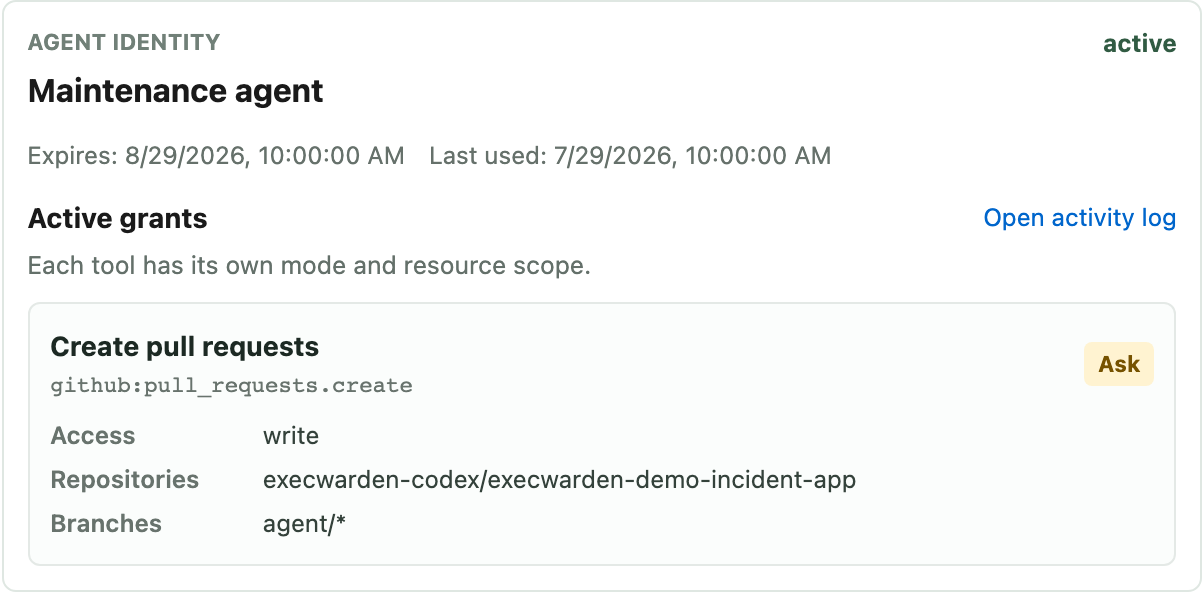
Before the run, inspect the identity details and confirm the active grant count, expiry, and client setup values match the task.
Expected setup state: a named identity with the GitHub action, repository allowlist, branch pattern, and Ask mode visible together.
Choose Runtime and Execution
Alvoki-hosted session
Alvoki owns the model loop, transcript, and run state. Without connected compute it has bounded JavaScript, bounded public HTTP where enabled, and granted capability calls, not a general shell or filesystem.
Connected execution environment
For hosted coding work, connect a customer-configured VM, Docker environment, or local machine. It supplies the shell, files, processes, git, browser, tests, containers, and network access configured for the task.
External MCP client
Codex CLI, Claude Code, OpenCode, or another client owns the agent loop and uses its existing local or remote environment. Alvoki governs only the capabilities that client calls through MCP.
Approval continuation
Ask mode queues the exact payload, but whether a run continues automatically after approval depends on the calling surface and client behavior.
Multiple repos
Keep the allowlist explicit when the job needs more than one repository. A selected repo set is still a narrow boundary if it is intentional and reviewable.
Run and Review
Ask for a small change
Ask the agent to inspect the repo, patch in the attached machine-backed execution environment, run tests, push agent/<task-name>, and open or update a PR with the diff and test result.
Check the branch boundary
The branch push should work only for the allowed review branch pattern. Pushes to main, master, or another unapproved branch should fail.
Approve the PR action
When the agent asks to create or update the PR, review the exact owner/repo, base branch, head branch, and title before approving. Ask queues that payload; the continuation step is client-dependent.
Use GitHub for review
Review the branch or PR with the normal diff, checks, comments, and review history. Merge should remain unavailable unless you granted it separately.
Check the activity log before widening scope
Open the identity or activity log and confirm the record names the caller, capability, repo, branch, approval decision, provider result, and timestamp.
Expected Ask-mode state: the exact owner, repository, branches, and title are visible before the call executes.
Verify Cleanup
Before granting broader authority, regenerate the Agent identity token once, disable or revoke the test identity, retry the old token, and confirm future tool calls fail. Revocation stops future calls through Alvoki; it does not undo provider actions that already happened.
Regenerate
The newly issued token works; the previously copied token should fail on the next MCP request.
Disable or revoke
The identity should disappear from the callable surface or return an authorization failure when the same client retries.
Inspect the record
The activity log should show the useful calls and approval decision. The identity status and old-token retry explain why later calls are denied.
Compare with the completed run
When you want the hosted path that worked, open Completed Run and compare the repo, branch, and grant shape.
Expected Result
The agent can read and patch
It can clone/fetch the allowed repo, edit in the attached machine-backed execution environment, run tests, and push only to the allowed review branch.
Risky GitHub API actions pause
PR create/update/review/comment actions in Ask mode pause with the exact payload before execution.
Merge is not ambient authority
Merge does not work unless you explicitly grant github:pull_requests.merge, preferably in Ask mode for a reviewed run.
The activity log explains mediated calls
Inspect the caller, capability grant, repo, branch, PR action, approval decision, and provider result before widening scope.
Cleanup is observable
A regenerated, disabled, expired, or revoked identity leaves you with a concrete old-token failure rather than a vague promise that access was removed.