Automation
Build repeatable agent workflows from requests, schedules, and events.
Design a saved graph directly, combine deterministic and agent steps, and keep scoped capabilities and approvals intact across manual, scheduled, and event-started runs.
Workflow Model
Use a workflow when the work should run again from a manual request, schedule, or event. You can design it directly as a persisted graph of explicit steps and branches. Each run saves progress between steps and keeps the definition and access-policy snapshot it started with.
How Runs Start
A trigger creates a run and stores its input as run context. The graph itself stays the same regardless of whether a person, a clock, or another system supplied that input.
Agent Touchpoints
One Agent identity can respond from several systems while inbound context and outbound authority remain separate. Slack makes the pattern concrete:
See the Saved Workflow
The console keeps the graph, exact trigger source and event type, and tool scopes visible before you start another run.
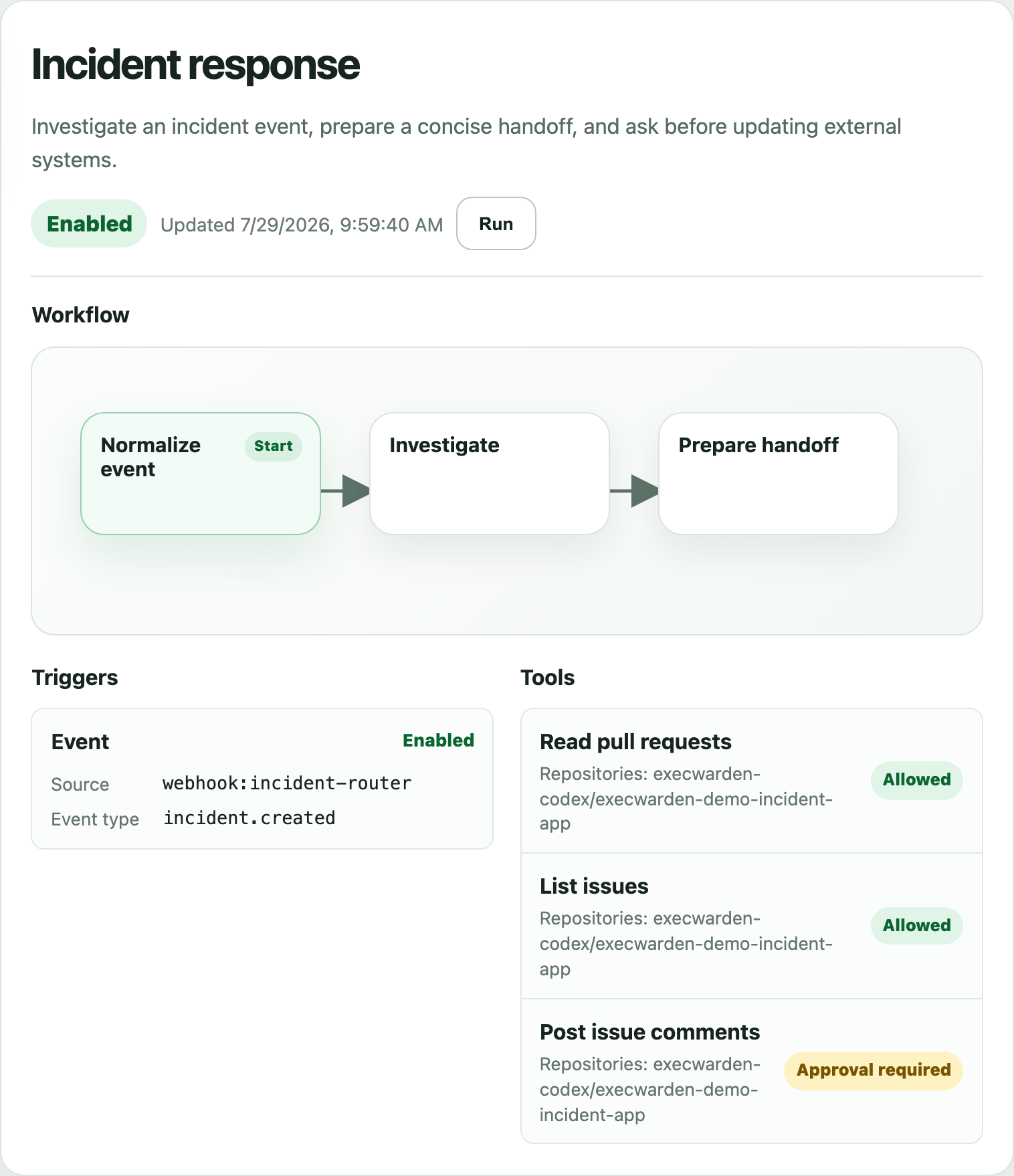
What a Workflow Stores
Create One From a Prompt
Open the Workflows page, describe the job and how it should start, and start the workflow-building agent. Alvoki opens that agent with workflow admin capability and asks it to call workflow:validate before workflow:create or workflow:update. If the request is ready, the agent saves the workflow and links back to it; if credentials, package setup, or policy details are missing, it should draft the shape and explain what to review before the workflow is runnable. Open the saved workflow from the returned link or the Workflows page to inspect its definition, run it, and review the run evidence.
Advanced fallback: start a generic agent session, open Configure capabilities, enable Workflow authoring with Admin access, then ask for the workflow you want. That manual route uses the same workflow management functions, but the Workflows-page authoring panel is the primary entry point.
Create a manual workflow named Echo input. It should accept a JSON object, return it with an ok flag, and be enabled so I can run it from the Workflows page.

Create a manual workflow that starts an agent to inspect my repo status, summarize open risks, and ask before making any GitHub write.

Create a scheduled workflow named Daily readiness check. It should run every weekday at 09:00 Europe/Brussels time, inspect a JSON input trigger object, and return a concise ok/status result.

Create a graph workflow with a JS step that checks a condition from input. If it is not ready, return a durable wait for 60 seconds; otherwise finish with a ready result.

Create a workflow that subscribes to the existing webhook:incident-router receiver's incident.created event and starts an investigation agent with the event payload.
For webhooks, set up the receiver first from the Webhooks page or a webhook-capable agent, then create a workflow that subscribes to the receiver's emitted events. Webhook handlers publish workflow events; workflows do not subscribe to raw HTTP requests. See Webhook Events for the receiver and handler shape.
Example Workflow Shapes
Keep PRs current
A manual workflow run starts an agent that rebases branches, runs tests, and shows the branch update before pushing within the branch policy.
Fix red builds
A manual or GitHub/custom webhook event-triggered workflow starts an investigation with repo and CI context.
Poll remote readiness
A JS step checks an external condition, returns a durable wait when it is not ready, then resumes later without keeping a process alive.
Review comments loop
A manually run workflow reads review comments, proposes edits, and asks before writing.
Nightly report
A scheduled workflow produces a report artifact without write authority, with one run per scheduled slot.