Event ingress
Turn signed HTTP callbacks into workflow events.
Webhook receivers verify incoming requests, run a small JavaScript handler, and publish normalized events that workflows subscribe to by source and type.
When to Use Webhooks
Use a webhook when another system should start work and can send a signed HTTP callback. Keep provider parsing in the receiver handler, emit a small normalized event, then let a workflow decide what happens next with scoped capabilities and approvals.
Mental Model
Webhooks are an ingress path, not workflow triggers by themselves. A receiver verifies the request, runs a short JavaScript handler in the safe Wasm JS runtime, and the handler may emit one or more workflow events. Workflows subscribe to those emitted events by source and eventType.
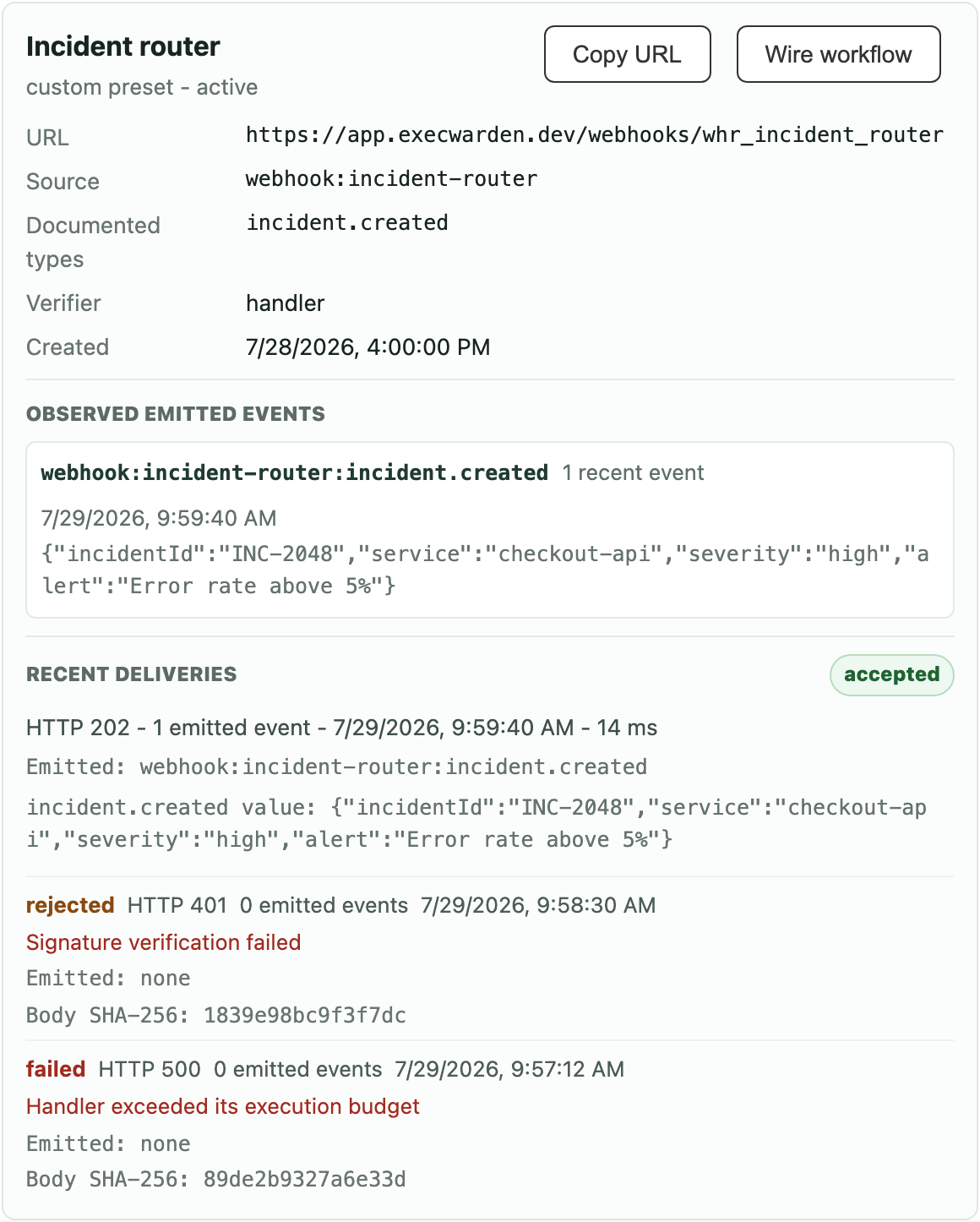
Inspect the Receiver and Its Deliveries
The receiver view shows the callback endpoint, normalized source and documented event types, observed event data, and recent delivery outcomes. Rejected signatures and handler failures remain visible beside accepted deliveries.
Set It Up Through an Agent
The Webhooks page opens a setup agent with webhook management context. For an end-to-end setup, give the session concrete webhook receiver and workflow grants, then ask it to fetch the focused guides before saving anything.
Create a custom webhook receiver for our incident router.
It should accept signed JSON payloads, emit incident.created events, simulate the handler with a sample payload, then create an enabled workflow that subscribes to that event and starts an investigation run.

Use source webhook:incident-router and event type incident.created.
Use the provider delivery id header x-incident-event-id as the idempotency key.
Verify x-incident-signature as HMAC-SHA-256 of the raw body with the receiver secret.The agent should call gateway:webhook_setup_guide, list or get existing receivers, create or update the receiver, simulate the handler, call gateway:workflow_guide, validate the workflow definition, and then save the workflow.
Custom Receiver Example
A custom receiver documents its expected event types for people and agents. The handler still owns the real event emission, so keep the script small and normalize provider payloads before workflows consume them.
async (input, webhook) => {
  const expected = "sha256=" + webhook.crypto.hmacSha256Hex(input.receiver.secret, input.rawBodyText);
  const actual = input.headers["x-incident-signature"] || "";
  if (!webhook.crypto.timingSafeEqual(actual, expected)) {
    return webhook.reject(401, "invalid signature");
  }
  if (input.bodyParseError) {
    return webhook.reject(400, input.bodyParseError);
  }
  const body = input.body && typeof input.body === "object" ? input.body : {};
  const incidentId = typeof body.id === "string" ? body.id : null;
  const eventId = input.headers["x-incident-event-id"];

  if (!incidentId) {
    return webhook.reject(400, "missing incident id");
  }

  if (!eventId) {
    return webhook.reject(400, "missing incident event id");
  }

  webhook.emit({
    type: "incident.created",
    idempotencyKey: eventId,
    value: {
      incidentId,
      severity: body.severity ?? "unknown",
      title: body.title ?? "Untitled incident",
      receiverId: input.receiver.id
    }
  });

  return webhook.accept();
}Workflow Subscription Example
The workflow receives the handler's value as ctx.input.event. It also receives trigger metadata under ctx.input.trigger.
{
  "name": "Incident webhook investigation",
  "enabled": true,
  "triggers": [
    {
      "id": "incident-created",
      "kind": "event",
      "source": "webhook:incident-router",
      "eventType": "incident.created",
      "enabled": true
    }
  ],
  "definition": {
    "runtime": "graph",
    "startStepId": "main",
    "steps": [
      {
        "id": "main",
        "kind": "wasm-js",
        "entrypoint": "main",
        "source": "export function main(ctx) { return { ok: true, incidentId: ctx.input.event.incidentId, severity: ctx.input.event.severity }; }"
      }
    ]
  }
}
GitHub Webhook Example
For GitHub, create a receiver with source: "github" and a handler built from the cookbook's Recipe A (sha256= over the raw body, header x-hub-signature-256). The handler verifies the signature, reads x-github-event and payload action, then emitssource: "github" events such as pull_request.opened, pull_request.synchronize, push, and workflow_job.queued.
{
  "triggers": [
    {
      "id": "pr-opened",
      "kind": "event",
      "source": "github",
      "eventType": "pull_request.opened",
      "enabled": true
    }
  ]
}